Sunday, 23 March 2014

Apache : What is reverse proxy, How it's work and Configuration


Apache : What is reverse proxy, How it's work and Configuration


Coming Soon............Stay Tune :)

Sunday, 16 March 2014

Apache : Troubleshooting Load Balancing, Status with mod_status and mod_info, Monitoring with WebLogicBridgeConfig


Apache : Troubleshooting Load Balancing, Status with mod_status and mod_info, Monitoring with WebLogicBridgeConfig


If you have knowledge of apache or any other web server like IIS, Iplanet etc and any application server like weblogic, websphere, jboss, tomcat etc, and worked or working in a support environment then you must have knowledge on web server and application server integration, and the concept of load balancing.

Most of the very common issue related with same we generally see is uneven load balancing of requests from web server to the application server. almost all of the organizations use a hardware load balancer ( like bigip, cisco ace etc ) either to divert the request to web server and then from web server to application server, or some organizations don't use web server and directly  send request to application server.

So, the basic architecture with hardware load balancer, web server and application server is -

Architecture 1
hardware load balancer => web server => application server ( with a single web server )


Architecture 2
hardware load balancer => web server => application ( more than one web server )


Architecture 3
hardware load balancer => application server ( without web server )


Architecture 4
hardware load balancer => application server ( with two hardware load balancers )


Based on above diagrams, you can imagine we can use n numbers of hardware load balancers, n number of web servers, and n number of application servers combinations to create a proper load balancing environment.

One thing I would like to clear you that there is no relation of cluster algorithms with the web ( http ) requests, means weblogic cluster don't  do the load balancing of http requests, for that you have to use either a web server or harware load balancer for load balancing the http requests.

Now,  the main issue we generally face is the load balancing from web server or hardware load balancer to application servers not working properly. ideal behavior is all nodes in the cluster should get equal number  ( or almost equal )  of requests.

 I am going to demonstrate you what could be possible causes of this, how we can troubleshoot it.

So, the first question is -

What could be the cause of uneven distributions of requests ?

Problem 1
you can define problem as, uneven load balancing of http requests due to uneven load balancing of http sessions.
Basically, proxy send requests to clustered nodes without session cookie, means every time request reach  to web server it divert to next new node on the cluster in round robin fashion, means each node in the cluster should get equal number of http sessions. if this does not happen, your any of the node or nodes in cluster will get more number of http sessions because of sticky session load balancing policy or you can say session affinity based load balancing.

what happened with sticky or session affinity load balancing is, when your http request connect with a server/node in a cluster, all subsequent requests for the same session send to the same server/node every time, that request create a session and maintain it in the request header, thus called uneven load balancing.
So, you can directly go ahead and disable the sticky load balancing / session affinity at hardware load balancer level.

Problem 2
Generally a proxy maintain a in-memory list of clustered nodes in General server List, which contain all the servers in good health at that of time, and proxy send requests to all nodes in round robin fashion. proxy general server list is almost the same as static servers defined in web server file, but sometime if there is some issues with any of the clustered node(s)/server(s) the proxy General Server List shrink to limited number of servers/nodes with good in health and this also cause unequal load balancing.


Troubleshooting - 

There are certain ways to troubleshoot this problems. below troubleshooting ways and steps are based on apache and weblogic configuration.

1. Enabling WebLogicBridgeConfig using DebugConfigInfo parameter at apache
2. Enabling server-status using mod_status module at apache

and with both above options, you have to enable Debug parameter also to enable the debug logging for apache.

Enabling WebLogicBridgeConfig using DebugConfigInfo parameter at apache

Below is my apache configuration
# Enable this with DebugConfigInfo to get detailed information
ExtendedStatus On
# Module to configure apache with weblogic
LoadModule weblogic_module modules/mod_wl_20.so
# configuration to access any of the web application deployed on weblogic
<Location />
SetHandler weblogic-handler
</Location>
# weblogic nodes configuration, with enable Debug and DebugConfigInfo
<IfModule mod_weblogic.c>
WebLogicCluster localhost:7002,localhost:7003
Debug ALL
DebugConfigInfo on
WLLogFile c:/temp/wlproxy.log
WLTempDir c:/temp


Enabling server-status using mod_status module at apache
# Enable server-status module and configuration to access server-status
</IfModule>
LoadModule status_module modules/mod_status.so
ExtendedStatus On
<Location /server-status>
   SetHandler server-status
      Order Deny,Allow
#   Deny from all
   Allow from localhost
   </Location>


Rest Coming Soon...............

Apache : Configuration with Weblogic Server, Load Balancing, Performance Tuning

Saturday, 15 March 2014

Weblogic Server : Custom Memory Heap Setting For Each Server


Weblogic Server : Custom Memory Heap Setting For Each Server

This is one of my favorite question which i frequently asked in lot's of interviews. We all know to change or alter memory heap size we have to chnage -Xms and -Xmx parameters either in setDomainEnv.sh or in startup script for managed servers startManagedServer.sh, but what would be case if I need to set different heap size for each managed servers? Yes, one way you most of the guys know is just create different startup script for each managed server and start server with the help of that, but most of the guys struggled a lot why changed heap is not reflecting even modified the startup scripts for all managed servers. so here are the reason and different ways which we can used to define different heap for different managed servers.

First, if you created separate startup files for each managed server then you have to make sure, inside each startup script, you should not be calling setDomainEnv.sh or commEnv.sh, otherwise your memory parameters will be override by the values existing in this script. So, make sure to define your memory heap parameters after any place where you are calling above scripts in your startup scripts.

Ok, Now here are different ways - 

1. For Admin Server 

Since, startWebLogic.sh is the script only used to start admin server, thus whatever the value you will update will reflect but only make sure you are updating new values after the place where you are calling, or i will add the values here in script


MEM_ARGS="-Xms<value>m  -Xmx<value>m"
export MEM_ARGS

2. For Managed Server(s)

You can have four ways to assign different memory arguments for managed servers

2.1 

Start your managed server as below 

startManagedWebLogic <Name_Of_Managed_Server> <Admin_URL> -Xms<value>m -Xmx<value>m

where <Name_Of_Managed_Server> is your managed server name.
<Admin_URL> is the Adminstration Server URL, for example http://localhost:7001
<value> in -Xms<value>m -Xmx<value>m, is the desired heap size, for example, -Xms512m -Xmx512m

2.2

Create custom scripts for each managed server and add memory heap parameters after you are calling setDomainEnv.sh, add as below 

After the JAVA_OPTIONS = "... {JAVA_OPTIONS}" line type:
JAVA_OPTIONS="${JAVA_OPTIONS} -Xms<value>m -Xmx<value>m"

2.3


If you are using the Node Manager then, From admin console, select the server, <Managed_Server> then configuration then Server Start then arguments, then add -Xms<value>m -Xmx<value>m under the arguments tab.


2.4

Directly edit the config.xml file and add argument as below

<server>
  <name>MS1</name>
  ...
  <server-start>
    <arguments>-Xms128m -Xmx128m</arguments>
  </server-start>
  ...
</server>

Ian s

Weblogic Server JDBC Connect String For Failover and Load Balancing

Weblogic Server Connect String For Failover and Load Balancing


There is a feature of JDBC ( not weblogic ) where you can use your single data source to load balance or failover the requests between different data source nodes ( for example different RAC nodes ), though it's good and easy to configure approach but have few limitations also.


A normal JDBC Connection String is like below 

jdbc:oracle:thin:@localhost:1521:XEDB


A Load-Balanced JDBC Connection String is like below 

jdbc:oracle:thin:@(description=(address_list=
(load_balance=on)
(failover=on)
(address=(protocol=tcp)(host=db1.localhst.com)(port=1521))
(address=(protocol=tcp)(host=db2.localhost.com)(port=1521)))
(connect_data=(service_name=rac_node1)))

A  Failover JDBC Connection String is like below 

jdbc:oracle:thin:@(description=(address_list=
(load_balance=off)
(failover=on)
(address=(protocol=tcp)(host=db1.localhost.com)(port=1521))
(address=(protocol=tcp)(host=db2.localhost.com)(port=1521)))
(connect_data=(service_name=rac_node2)))


Drawback would be - 


Failover would only occur at connect-time, that means during the automatic failover, weblogic will create a new data base connection to the other node instead of using the existing pool connection.

And second drawback is, Global XA transactions are not supported, because there is no guarantee that all of your database transaction involved in a a operation will be direct to the same RAC instance, that would lead some intermittent behavior.

Weblogic Server, Multi DataSource, Load Balancing and Failover


Multi DataSource, Load Balancing and Failover

If you have some idea on Data Source, clustering and cluster algorithms then it's very easy for you to understand Multi Data Source. 

Let me give you some idea. Data Source is a group of ready to use data base connection which is used to get connections) from database as well as for better performance. Since, all the connection created at server startup ( based on the max connection limit defined ) thus it don't make any overhead on application and application server to get connections dynamically at run time. application pick the connection from data source connection pool, used it and returned back to the pool. certain cases you must heard about connection leaking, it nothing just the connection(s) opened in pool, taken by the application but never returned to the pool. most of times it happened when developers didn't close the pool with proper syntax.

Just like a cluster where we grouped different managed server for high availability, Multi Data Source is also just a group of Data Sources used for high availability to provide load balancing and failover capabilities for JDBC connections. 

and like cluster algorithms, there are two algorithms provided with Multi Data Source, First one is round robin, and second one is Failover. as you can understand from the name itself, round robin is just to load balance the load equally between all data sources and Failover is to provide failover capabilities, but during lot's of technical interviews i had taken, i felt the use of Failover is not very clear to majority of guys :), let read below.


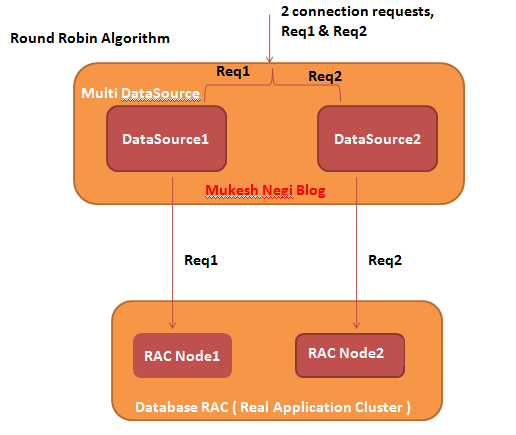
Round Robin Algorithm :

This algo simple load balance the requests between all assigned data sources. As shown in figure below, if your multi data source get 2 requests, then it will equally divert them between both available data source in cyclic manner. 


Failover Algorithm :

Data Source or Multi Data Source don't do the failover of current active connections, like if some connection which is server by data source1 got disconnect between processing some requests, then data source or multi data source will not failover request to other available connection, it can be handled at database level.

With this algorithm, doesn't matter how many data sources you have assigned to the multi data source, every request will be serve by the primary first data source in the list until and unless it got failed due to any reason. In that case, if your primary  data source got down, all incoming requests will be server by the second data source till first primary data source recovered. 


Based on the data source connect string configuration at database listener level, round robin algorithm could be like below


Based on the data source connect string configuration at database listener level, Failover algorithm could be like below

Based on the data source connect string with database service name configuration at database listener level, round robin algorithm could be like below


Based on the data source connect string with database service name configuration at database listener level, failover algorithm could be like below


Sunday, 9 March 2014

Apache : Concurrent threads, Idle threads, max and min possible threads ( Max and Min connections )


Apache : Concurrent threads, Idle threads, max and min possible threads ( Max and Min connections )

Based on the MPM ( multi processing modules ) your apache web server is using, below are the important parameters those governs all these configurations


# StartServers                 : initial number of server processes to start
# MaxClients                   : maximum number of simultaneous client connections
# MinSpareThreads         : minimum number of worker threads which are kept spare
# MaxSpareThreads        : maximum number of worker threads which are kept spare
# ThreadsPerChild           : constant number of worker threads in each server process

# MaxRequestsPerChild   : maximum number of requests a server process serves

For example - 

ServerLimit 16
StartServers 2
MaxClients 200
MinSpareThreads 25
MaxSpareThreads 75
ThreadsPerChild 25


1. First of all, whenever an apache is started, it will start 2 child processes which is determined      by StartServers parameter. 

2. Then each process will start 25 threads determined by ThreadsPerChildparameter so this      means 2 process can service only 50 concurrent connections/clients i.e. 25x2=50. 

3. Now if more concurrent users comes, then another child process will start, that can service          another 25 users. 

4. But how many child processes can be started is controlled by ServerLimit parameter, this    means that in the configuration above, I can have 16 child processes in total, with each child       process can handle 25 thread, in total handling 16x25=400 concurrent users. 

5. But if number defined in MaxClients is less which is 200 here, then this means that after 8      child processes, no extra process will start since we have defined an upper cap                  
   of MaxClients. 

6. This also means that if I set MaxClients to 1000, after 16 child processes and 400     
    connections, no extra process will start and we cannot service more than 400 concurrent    
    clients even if we have increase the MaxClient parameter. 

In this case, we need to also increase ServerLimit to 1000/25 i.e. MaxClients/ThreadsPerChild=40 So this is the optmized configuration to server 1000 clients

So, the good configuration will be 


<IfModule mpm_worker_module>
    ServerLimit          40
    StartServers          2
    MaxClients          1000
    MinSpareThreads      25
    MaxSpareThreads      75 
    ThreadsPerChild      25
    MaxRequestsPerChild   0
</IfModule>