Friday, 16 January 2015

Weblogic Server 12c Dynamic Cluster


Weblogic Server Dynamic Cluster

Weblogic Server 12C 12.1.2 onwards Oracle introduced a new feature of clustering, called Dynamic Clustering.  As clear from the name Dynamic, it’s a dynamic cluster where Managed Servers created dynamically at cluster creation time based on a cluster template and no of managed servers you specified during cluster creation. So, you don’t need to create Managed Servers separately, just mention how many managed servers you want with some basic configuration details like range of ports which you want to assign to managed servers, prefix for managed servers which will add at start of each managed server etc, and based on the standard template all managed servers will be created there. For any configuration changes you just have to change template configuration and it will be applicable for all clustered managed servers.


Another important use is, if anytime you think that you need one or more than one managed servers, just change the no of managed servers count configuration and it will create managed servers for you, you just go and restart newly created managed servers and it/they will start participating in cluster requests.


More Coming Shortly.............

Thursday, 15 January 2015

Node Manager in Weblogic Server 12C


Node Manager in Weblogic Server 12C

In WebLogic 12c, the Java version of Node Manager has a simplified, out-of-the-box configuration. Node Manager is moved from PerHost configuration to PerDomain configuration model. The Install Windows Service screen, which provided the option to install Node Manager as a service on Windows systems, is no longer included.

In WebLogic 12c for each domain you create, an instance of domain-specific Node Manager is created/configured by default. With this default configuration, using the security credentials supplied for the Administration Server, nm_password.properties is created in DOMAIN_HOME\config\nodemanager. We can use Configuration Wizard or WLST tools to create Domain/Node Manager configuration. We can select a PerDomain or CustomLocationJava-based Node Manager configuration model. The PerDomain configuration is exactly as described for the default configuration, except that it allows you to provide unique Node Manager credentials. If you want a seperate location for NodeManagerHome, select CustomLocation and specify an empty directory or select to create one. The resulting Node Manager also runs as a per domain process.

After the default installation, the nodemanager.properties and nodemanager.domains files are created for you under DOMAIN_HOME\nodemanager and domain-specific scripts to start, stop, install and uninstall Node Manager as a Windows service, are created under DOMAIN_HOME\bin. With the default Node Manager configuration, you cannot edit the NodeManagerHome location, in this case it will be DOMAIN_HOME\nodemanager.

Let's see the process step by step. I will use the configuration wizard tool to create a sample domain. After starting the wizard and proceeding for the first few steps you will be prompted to choose the components to modify/create. Here you can select Node Manager option to configure some of it's properties like Node Manager type, Node Manager username and password, and Node Manager location.


On the next screen we can modify the following properties;

Node Manager Type:

Per Domain: If you select this option, the Node Manager home is predefined within the domain as <domain_name>/nodemanager and you cannot edit the Node Manager home. 

Custom Location: Select this option if you want the Node Manager configuration files to be created in a specific location for this domain. Specify the directory in the Node Manager Home field, or click Browse to navigate to the location. The specified directory must be empty. The nodemanager.properties and nodemanager.domains files will be created in this directory. 

Manual Node Manager Setup: If you select this option, creation of the Node Manager configuration for the domain is skipped, and you must manually create and update the Node Manager configuration for the domain.

Node Manager Credentials: Here you enter the username and password for this Node Manager instance.


After the wizard exits, we will have the following folder structure and the Node Manager related configuration files. 

Please remember you can still use Per Host Node Manager (scripts are located in WL_HOME\server\bin). However there is extra step you must take to use this model. Below is the summary of this steps;

1. Create a nodemanager.domains file that specifies the domains that you want this Node Manager instance to control, under      ORACLE_HOME\oracle_common\common\nodemanager, the per host NodeManagerHome location.

2. Generate a certificate and private key to communicate with Node manager over SSL


Reference : -  https://blogs.oracle.com


WLS License


All about Weblogic Server License


Weblogic Server 10.3.0 Onwards


Weblogic Server 10.3.0 onward, You don’t need to download & apply any license file for Weblogic. 

All available features are without any license file like unlimited number of CPU’s and unlimited no of users, as well as it’s not tied up with I.P address of the machine.

Hold on! No need to apply license on Weblogic physically doesn’t mean you don’t need any license for commercial use of Weblogic and you can just download and start using in production with n number of users and n number of CPU’s etc. You still have to purchase a license from Oracle, which you can say an agreement between you and Oracle about how many Users & CPU’s etc you are going to use. So, overall before buying Weblogic from Oracle you just have to identify your production requirement like no of users, CPU’s, Cores etc and then get an agreed license from oracle that you will not go beyond that in any case during utilization, and all terms, conditions and technical restrictions will specified in your license and agreement with Oracle.


Auditing Licensed Features

Further, to make sure your are running as per agreement and under compliance, a WebLogic Server Basic License Feature Usage Measurement script provided by the oracle, which you can in your production environment and see if you are running as per license agreement and under compliance. If you have authorized access to oracle support portal then you can download it from Doc ID 885587.1 otherwise please contact with Oracle for same.

Prior to Weblogic Server 10.3.0

You can download license for earlier versions of Weblogic products from below link.


To apply Weblogic license –


  • Download proper license file according to your weblogic version and licensed configurations
  • Stop Weblogic server
  • Rename your existing license.bea file ( under BEA_HOME )
  • Rename new downloaded license file as license.bea file and copy under BEA_HOME
  • Restart your weblogic server
  • Verify logs and if server started properly and no erro.r observed in logs means your weblogic license applied successfully.

Upgrading Weblogic Service Packs or Versions

No new license needed if you are upgrading service packs on same versions.

For example, no license needed if you are upgrading Weblogic 9.2 to Weblogic 9.2 MP2, Weblogic 10.0 to Weblogic 10.0MP1, Weblogic 8.1SP2 to Weblogic 8.1 SP6 etc.

But if you are upgrading major versions like from 8.x to 9.x or 9.x to 10.x etc then you have to get agreement , download and apply new license file ( read first section of my this same article “Weblogic Server 10.3.0 Onwards” for same .


Development/UAT/Test License (Prior to 10.3.0)

Prior to Weblogic 10.3.0, Development license restricted to 5 client connections only. If you would like to test your Dev/Test environment for more connections then download new license file from http://licensecodes.oracle.com/bea.htmlafter accepting the terms and conditions.

Wednesday, 14 January 2015

Oracle WebLogic Server Active GridLink for Real Application Clusters (RAC)


Oracle WebLogic Server and Oracle RAC are designed to work together to provide an environment for highly available and scalable applications. 

Oracle WebLogic Server Active GridLink for RAC provides the best available support for the Real Application Clusters (RAC) features in Oracle Database 11g, minimizing database access time while allowing transparent access to rich pooling management functions that maximizes both connection performance and availability

There are two data source implementations in Oracle WebLogic Server to support Oracle Real Application Clusters (RAC) –

1.     First, Multi data source solution which has been used successfully in customer production deployments.

2.    Second, New implementation in Oracle WebLogic 11g Release 1 (10.3.4) called Oracle WebLogic
     Active GridLink for RAC which is the market-leading mid-tier integration solution leveraging the latest and greatest Oracle RAC advances.

Note : -Database RAC ( Real Application Cluster ) is a concept just like Weblogic Clustering where multiple instance of database run in parallel for providing failover, load balancing and performance.


Multi Data Source – Capabilities and Limitations

The WebLogic Server JDBC subsystem has supported Oracle RAC since WLS version 8.1 SP5, originally developed for Oracle9i RAC.

This support is based on a particular type of data source configuration, called a multi data source.

A multi data source is a group of multiple data sources.

It serves JDBC connections from each of the member data sources according configuartions.


A RAC multi data source configuration requires that each member data source obtain connections to a particular RAC instance, as shown below for a three-node RAC cluster configuration.


Capabilities

WebLogic RAC multi data source configurations provide the following capabilities :

Load Balancing

When the Multi Data Source algorithm is set to load balancing, application connection reserve requests are served from each member data source in a round robin fashion. This allows for improved utilization of the cluster resources than the failover policy, and is supported for XA data sources as well.

Failover

The failover Multi Data Source algorithm causes connection borrow requests to be served from a single member data source until such time as the member is unavailable. Failover can optionally occur when the pool’s capacity has been exhausted. The failover policy is typically used with active-passive architectures.

XA Affinity and Failover

When accessed within a global transaction, the member data source from which the JDBC connection was obtained is pinned to the global transaction for the life of the transaction. This ensures that all database operations performed on connections obtained from the Multi Data Source, for a particular transaction, all execute on the same RAC instance.

XA affinity results in improved performance and is even a requirement for older versions of RAC, such as prior to 11g. If a pinned RAC instance suffers a failure, then a global transaction can complete utilizing a different RAC instance using a connection obtained one of the other member data sources.

Limitations

The WebLogic Multi Data Source is a pure middle tier implementation which does not leverage the Oracle RAC features such as the Oracle Notification Service (ONS).

As a result, WebLogic Multi Data Sources do not have immediate knowledge of backend events, and have related functional limitations described below.

Configuration Complexity

A WebLogic Multi Data Source requires n+1 JDBC modules (Data Sources) to be configured, where n is the number of nodes in the RAC cluster.

For RAC service configurations, a separate multi data source is required for each defined service. In addition, the configuration itself is static and requires administrative intervention to add or remove data sources when changes are made to the RAC cluster topology.


 Connection Polling

Connection polling is the mechanism used in Multi Data Source to determine the viability of individual JDBC connections and to detect changes in the RAC cluster topology. This mechanism is an alternative mechanism to use of backend notification services.

Although effective, performing SQL operations on individual connections comes at the expense of additional runtime overhead, and potentially delayed detection of RAC node failures. Also, the potential exists for false positives that could result in the unnecessary disablement of the data source pool and the termination of valid connections that may be in use by applications.

Load Balancing Algorithm

The round-robin load balancing employed by WebLogic Multi Data Source implementation distributes work evenly across all member data sources. Finer grained control is desirable for situations where RAC instances exhibit different performance/response time characteristics.

XA Affinity per MDS

XA affinity is provided by each Multi Data Source. When several Multi Data Sources are enlisted in a global transaction, it is possible that connections could be obtained from different RAC instances. This results in branches of the same global transaction being processed by separate RAC instances. Although supported in later RAC versions, it is less than optimal from a performance perspective.


Active GridLink for RAC

Oracle WebLogic Server 10.3.4 introduced a single data source implementation to support an Oracle RAC cluster.It responds to FAN events to provide Fast Connection Failover (FCF), Runtime Connection Load-Balancing (RCLB), and RAC instance graceful shutdown. XA affinity is supported at the global transaction Id level. The new feature is called WebLogic Active GridLink for RAC; which is implemented as the GridLink Data Source within WebLogic Server.

The RAC integration capabilities of Universal Connection Pool (UCP) have been utilized by the WebLogic Server GridLink Data Source implementation to provide the FCF, RCLB and Affinity features.

With the key foundation for providing deeper integration with Oracle RAC, this single data source implementation in Oracle WebLogic Server supports the full and unrestricted use of database services as the connection target for a data source.

The active management of the connections in the pool is based on static settings configured on the connection pool itself (min/max capacity, timeouts, etc.) and real time information the connection pool receives from the RAC Oracle Notification Service (ONS) subsystem that advises the “client” of any state changes within the RAC cluster

  
The Universal Connection Pool Java library has been integrated with WebLogic Server and been utilized by WebLogic GridLink data source implementation to provide the Fast Connection Failover, Runtime Connection Load Balancing and Affinity features.

Upgrades from RAC Multi Data Sources to Grid Link Data Sources are straight-forward and involve creating a single Grid Link Data Source with the same JNDI name as the Multi Data Source, which reduces the number of configuration artifacts to maintain.


Fast Connection Failover

The Fast Connection Failover (FCF) feature is a Fast Application Notification (FAN) client implemented through the Universal Connection Pool. The feature requires the use of an Oracle JDBC driver and an Oracle RAC database or use of Oracle Restart on a single instance database. WebLogic GridLink Data Source has been integrated with FCF from Universal Connection Pool implementation and uses FCF to:

• Provide rapid failure detection
• Abort and remove invalid connections from the connection pool quickly
• Perform graceful shutdown for planned and unplanned Oracle RAC node outages
• Adapt to changes in topology, such as adding or removing a node
• Distribute runtime work requests to all active Oracle RAC instances, including those rejoining a  
   Cluster

ONS is used by the Oracle RAC database to broadcast events that describe a change of state. GridLink Data Sources can register to receive notifications from ONS and therefore quickly become aware of any state changes in a RAC database. Using these state change notification events, GridLink Data Sources can intelligently adapt its connection pools so that it provides continuous, reliable and efficient access to the RAC database as changes happen.

An adaptive response to state changes in the RAC cluster allows WebLogic Server to handle outages by immediately retracting, closing and discarding connections to RAC instances that have been stopped or taken out by an unplanned outage, without needing to periodically poll the connections to ensure they are valid, or affecting uninvolved connections to surviving nodes. This eliminates the need to test connections to ensure applications are not given dead connections and quickly removes dead connections from RAC node failures, which in some failure modes, might otherwise hang for minutes.

Further, it allows WebLogic Server to proactively reapportion its set of connections to support scenarios where new RAC instances are added or are restarted after an outage. This results in WLS being able to make full use of the resources within the RAC database. Furthermore, using the database service model, this allows database administrators to make changes to the RAC service/instance allocations, which are then seamlessly applied through the affected WLS connection pools without needing to make configuration changes to the connection pool configuration. It also removes the need to create complex arrangements of multiple data sources to represent a dedicated instance of the RAC database.

The WebLogic GridLink Data Source provides Fast Connection Failover capabilities and responds to RAC database service and node events {UP, DOWN} to ensure that the reserve of physical connections in the pool are always pointing to a valid database node; and it ensures that the reserve of physical connections are well distributed across the available database nodes.

The Fast Connection Failover behavior is enabled as a configuration setting on the GridLink Data Source.

With the Fast Connection Failover capability enabled, the following scenarios are supported:

Planned down Event - Planned outages are defined as database maintenance or other activities that are needed to perform at a known point in time. Support for these events is available where an Oracle RAC service can be gracefully shutdown. In such scenarios, any borrowed or in use connections are not interrupted and closed until work is completed and control of the connection is returned to the pool. This provides an extremely efficient way in large heterogeneous customer environments to manage planned outages.

Unplanned down Event - Support for unplanned outages is provided by detecting and removing stale connections to an Oracle RAC cluster. Stale connections include connections that do not have a service available on any instance in an Oracle RAC cluster due to service-down and nodedown events. Borrowed connections and available connections that are stale are detected, and their network connection is severed before removing them from the pool. These removed connections are not replaced by the pool. Instead, the application must retry connections before performing any work with a connection. The primary difference between unplanned and planned shutdown scenarios is how borrowed connections are handled. Stale connections that are idle in the pool (not borrowed) are removed in the same manner as the unplanned shutdown scenario

Up Event - Oracle RAC Instance Rejoin and New Instance Scenarios - Scenarios where an Oracle RAC cluster adds instances that provide a service of interest are supported. The instance may be new to the cluster or may have been restarted after a down event. In both cases, WebLogic Connection Pool for JDBC recognizes the new instance and creates connections to the node as required.


 Runtime Connection Load Balancing

WebLogic GridLink Data Sources and JDBC connection pools leverage the load balancing functionality provided by an Oracle RAC database to provide better throughput and more efficient use of resources.

Oracle performance analysis has revealed significant performance benefits from the use of runtime connection load balancing vs. a static round-robin algorithm. These benefits are observed even when nodes in the RAC cluster are balanced from a hardware perspective, and when the average load on the nodes on the cluster are expected to be reasonably uniform on average.

Transient differences in load characteristics are often sufficient to make runtime connection load balancing the optimal load balancing mechanism for RAC clusters. The load balancing advisory service issues FAN events that advise clients on the current state of the cluster including advice on where to direct connections to. WebLogic Server connection pool receives load balancing advisory events issued by the database, and distributes connections to the RAC nodes accordingly as shown in the diagram below.


Runtime connection load balancing provides the following benefits:

• Manages pooled connections for high performance and scalability

• Receives continuous recommendations on the percentage of work to route to database instances

• Adjusts distribution of work based on different back-end node capacities such as CPU capacity or response time

• Reacts quickly to changes in cluster reconfiguration, application workload, overworked nodes, or hangs

• Receives metrics from the Oracle RAC Load Balance Advisory. Connections to well performing instances are used most often. New and unused connections to under-performing instances will gravitate away over time. When distribution metrics are not received, connection is selected using a random choice.

 Connection Affinity

WebLogic GridLink Data Sources leverage affinity functionality provided by an Oracle RAC database. Connection affinity requires the use of an Oracle JDBC driver and an Oracle RAC database version 11.1.0.6 or higher.

Connection affinity allows a connection pool to select connections that are directed at a specific Oracle RAC instance to provide the best performance for the customer applications. The pool uses run-time connection load balancing to select an Oracle RAC instance to create the first connection and then subsequent connections are created with an affinity to the same instance. WebLogic GridLink Data Sources supports transaction-based affinity.

  Transaction-Based Affinity

Transaction-based affinity is an affinity to an Oracle RAC instance that can be released by either the client application or a failure event. Applications typically use this type of affinity when long-lived affinity to an Oracle RAC instance is desired or when the cost (in terms of performance) of being redirected to a new Oracle RAC instance is high.

WebLogic XA connections that are enlisted in a distributed transaction keep an affinity to the Oracle RAC instance for the duration of the transaction. In this case, an application would incur a significant performance cost if a connection is redirect to a different Oracle RAC instance during the distributed transaction.

The affinity will be established based on the global transaction id, instead of by individual data source, to ensure that connections obtained from different data sources that are configured for the same RAC cluster are all associated with the same RAC instance. The LLR two-phase commit optimization will be supported by the RAC data source and will also participate in XA affinity.


Regerence : http://www.oracle.com

Sunday, 30 March 2014

Apache Virtual Host Definition and Configuration


Apache  : What is Virtualhost ? and how to configure Virtualhost with apache? 


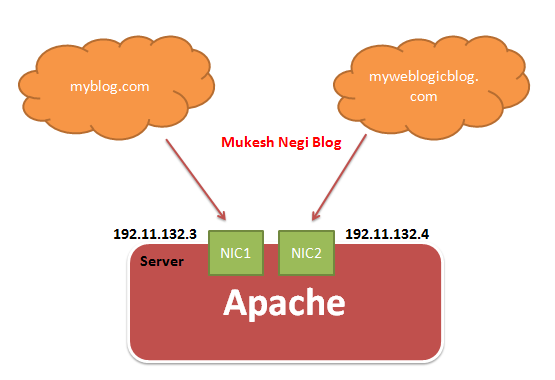
Virtual Host as explained by name itself, is something with which you can run multiple websites on same server. for example I have two website myblog.com and myweblogicblog.com running on same physical server where i have an apache server is running. So, if i will access myblog.co.com.com or myweblogicblog.com, both will server by same physical server and by same apache server. ( multiple websites and one apache server )


There are two type of virtual hosting - 

1. I.P based virtual hosting ( old one and rarely in use as of now )
2. Name based virtual hosting ( widely used option as of today )


In I.P based virtual hosting, you have to use separate i.p for each website, means you need to have separate ethernet card for each website. So, if you have myblog.c
om and myweblogicblog.com on same physical machine then you have to use separate NIC card for both to have a separate i.p for websites, this directly related with high cost.


In Name base Virtual hosting, you need only one i.p address for your server, your each website will point to same server, You have register all your websites on DNS to point to same i.p address. When apache webserver receives requests, based oh the hostname on header, it serves different websites.

 So, in below figure, both myblog.c and myweblogicblog.com will be pointing to same server with single i.p address, and during access of any of the website, based on hostname in header, requests will be server by the apache.


Configuration in Apache


1. First you have to uncomment below lines in apache httpd.cong

Include conf/extra/httpd-vhosts.conf

2.  You have to add entries in httpd-vhosts.conf under conf/extra folder.

NameVirtualHost *:80 
This shows that all of the name-based virtual hosts will be listen on the default port 80

<VirtualHost *:80> </VirtualHost>
You have to configure for each virtual host 

I will define two virtual hosts, one for myblog.com and other for myweblogicblog.com, both running on same default port 80

So, there will be two <VirtualHost *:80> </VirtualHost>, one for each website.

When you will access myblog.com, the files under C:\Apache\myblog will be served by Apache and the access_log and error_log for this site will go under C:\Apache\logs\myblog\

When you will access myweblogicblog.com, the files under C:\Apache\myweblogicblog will be served by Apache and the access_log and error_log for this site will go under C:\Apache\logs\myweblogicblog\


# C:\Apache\conf\extra\httpd-vhosts.conf

NameVirtualHost *:80

# myblog virtual host
<VirtualHost *:80>
<Directory />
        Allow from all
    </Directory>
    ServerAdmin mukesh.negi0910@outlook.com
    DocumentRoot "C:\Apache\myblog"
    ServerName myblog.com
    ServerAlias www.myblog.com
    ErrorLog "logs\myblog\error_log"
    CustomLog "logs\myblog\access_log" common
</VirtualHost>

#myweblogicblog virtual host
<VirtualHost *:80>
<Directory />
        Allow from all
    </Directory>
    ServerAdmin mukesh.negi0910@outlook.com
    DocumentRoot "C:\Apache\myweblogicblog"
    ServerName myweblogicblog.com
    ServerAlias www.myweblogicblog.com
    ErrorLog "logs\myweblogicblog\error_log"
    CustomLog "logs\myweblogicblog\access_log" common
</VirtualHost>

3. Restart your apache server

So, when you hit myblog.com then it will server from C:\Apache\myblog, and when you hit myweblogicblog.com then it will server from C:\Apache\myweblogicblog

For testing you can create a simple index.html files under C:\Apache\myblog and C:\Apache\myweblogicblog with a simple text like "from myblog.com" and "from myweblogicblog.com"


Saturday, 29 March 2014

Apache SSL Configuration : How to configure apache for SSL


Apache SSL Configuration : How to configure apache for SSL

Apache come with two versions, one for SSL and other for non ssl

So, if you are downloading apache for SSL configuration download in below format naming convention  

httpd-2.2.25-win32-x86-openssl-0.9.8y.msi

and if you are downloading apache for SSL configuration download in below format naming convention  


Download from here

http://httpd.apache.org/download.cgi#apache24
http://www.eng.lsu.edu/mirrors/apache//httpd/binaries/win32/
Installation is straight forward. I have  installed at C:\Apache

After installation -

Generate certificate ( private ) key

C:\Program Files (x86)\Apache Software Foundation\Apache2.2\bin>openssl   genrsa   -des3   -out server.key   1024
Loading 'screen' into random state - done
Generating RSA private key, 1024 bit long modulus
..................++++++
......++++++
e is 65537 (0x10001)
Enter pass phrase for server.key:
Verifying - Enter pass phrase for server.key:

Now, generate the certificate request ( CSR )

sharing the errors i have got during configuration on Windows

C:\Program Files (x86)\Apache Software Foundation\Apache2.2\bin>openssl req -new -key server.key -config " C:\Apache\conf \openssl.cnf" -out server.csr
error on line -1 of C:\Program Files (x86)\Apache Software Foundation\Apache2.2\conf \openssl.cnf
2036:error:02001003:system library:fopen:No such process:.\crypto\bio\bss_file.c:126:fopen('C:\Program Files (x86)\Apache Software Foundation\Apache2.2\conf \openssl.cnf','rb')
2036:error:2006D080:BIO routines:BIO_new_file:no such file:.\crypto\bio\bss_file.c:129:
2036:error:0E078072:configuration file routines:DEF_LOAD:no such file:.\crypto\conf\conf_def.c:197:
C:\Program Files (x86)\Apache Software Foundation\Apache2.2\bin>

if you get above error then,  copy openssl.con from conf to bin directory and run again

C:\Program Files (x86)\Apache Software Foundation\Apache2.2\bin>openssl req -new -key server.key -config openssl.cnf -out server.csr
Enter pass phrase for server.key:
Loading 'screen' into random state - done
You are about to be asked to enter information that will be incorporated
into your certificate request.
What you are about to enter is what is called a Distinguished Name or a DN.
There are quite a few fields but you can leave some blank
For some fields there will be a default value,
If you enter '.', the field will be left blank.
-----
Country Name (2 letter code) [AU]:webl0gic
string is too long, it needs to be less than  2 bytes long
Country Name (2 letter code) [AU]:IN
State or Province Name (full name) [Some-State]:UP
Locality Name (eg, city) []:Ghaziabad
Organization Name (eg, company) [Internet Widgits Pty Ltd]:OracleIndiaPvtLtd
Organizational Unit Name (eg, section) []:OnDemand
Common Name (e.g. server FQDN or YOUR name) []:weblogicserveradministration.blogspot.com
Email Address []:mukesh.negi0910@outlook.com

Please enter the following 'extra' attributes
to be sent with your certificate request
A challenge password []:webl0gic
An optional company name []:Oracle

Apache SSL configuration for self signed certificates

Generate the self signed  certificate using above generated private key and csr

C:\Apache\bin>openssl x509 -req -days 365 -in server.csr -signkey server.key -out server.crt
Loading 'screen' into random state - done
Signature ok
subject=/C=IN/ST=UP/L=Ghaziabad/O=Oracle/OU=OnDemand/CN=weblogicserveradministration.blogspot.com/emailAddress=mukesh.negi0910@outlook.com
Getting Private key
Enter pass phrase for server.key:


Now make sure to copy your server.key and server.crt files under conf directory.

Now, open httpd.conf file and enable below lines by removing #

LoadModule ssl_module modules/mod_ssl.so
Include conf/extra/httpd-ssl.conf

Now, go to conf/extra, open httpd-ssl.conf  and make sure below lines enabled, if not enabled by removing #

SSLCertificateFile "C:/Apache/conf/server.crt"
SSLCertificateKeyFile "C:/Apache/conf/server.key"

Now restart apaches and tests as below

https://localhost or https://localhost:443

Default secure port ( in httpd-ssl.cong ) is 443, if you want to change it then update at below locations in httpd-ssl.conf and restart apache

-----------------------------------------------------------
Listen 443
<VirtualHost _default_:443>
#   General setup for the virtual host
DocumentRoot "C:/Apache/htdocs"
ServerName localhost:443
-----------------------------------------------------------
and test as https://localhost:new_port_defined_in_httpd_ssl.conf

  
Apache SSL configuration for trusted Third Party certificates

Above is the self signed certificate SSl configuration, for third party trusted ssl configuration, send the generated .csr file to the certificate authority and they will send you two certificates, called intermediate( DigiCert will send you DigiCertCA.crt ) and primary certificate ( your_domain.crt) save it under conf directory and update httpd-ssl.conf for below parameters and restart apache.

SSLCertificateFile      /path/to/your_domain.crt
SSLCertificateKeyFile   /path/to/your_private.key ( which is server.key in our case )
SSLCertificateChainFile /path/to/DigiCertCA.crt ( enable this one also )